In Lab 2, We learned Assembly language base on 6502.
Here is the code:
lda #$00	; set a pointer at $40 to point to $0200
	sta $40
	lda #$02
	sta $41

	lda #$07	; colour

	ldy #$00	; set index to 0

loop:	sta ($40),y	; set pixel

	iny		; increment index
	bne loop	; continue until done the page

	inc $41		; increment the page
	ldx $41		; get the page
	cpx #$06	; compare with 6
	bne loop	; continue until done all pages
After we run the code above on 6502 Emulator, the screen will be filled by yellow.
Now we add tya between “loop” and “sta ($40), y” the screen will be filled by different color lines. The reason why it happens is that we write the data in register A to the screen pixels. Before we add tya, the data in a is #$07(yellow). But after we added tya, the data in register A will be changed in every loop from 00 to ff, the screen only take the last digit of the hex code as color code, so it only shows 16 color(0 – f). The screen size is 32*32(1024 pixels) and the screen contains 4 pages, from 0x200 until 0x50FF. so every page contains 256 (16*16) pixels and controls 8 (256 = 8*32) horizontal lines on the screen. Therefore, 16 colors pixels circle(0 – f) shows twice in a line cause a line has 32 pixels.
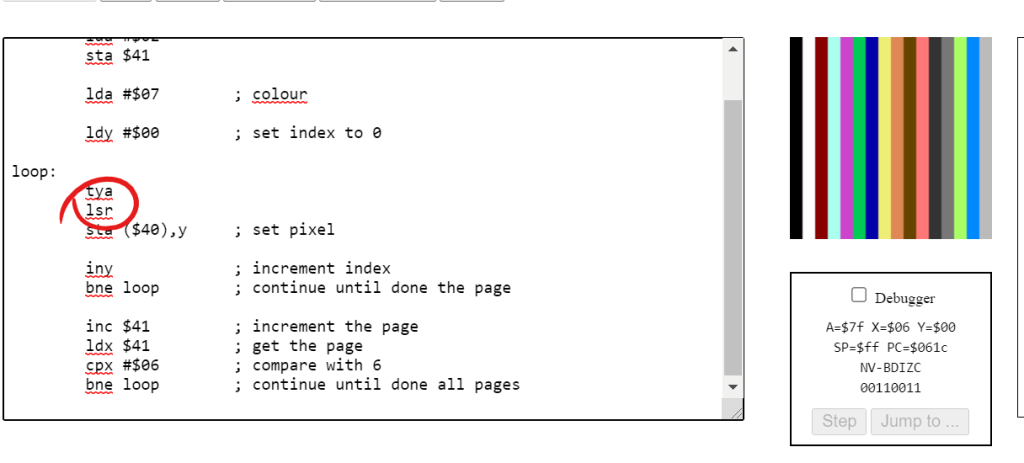
Now, let’s add lsr after tya. lsr shifts bit right for the data in register A, where saving the data that will be write to the screen. What gonna happen?
Well, it divides the unsigned integer stored in register A(we shift right once so that the integer is divided by 2^1). In this case, after we go through a line, the 16 colors circle only shows once and every color is showed twice.
What if we add lsr once again?
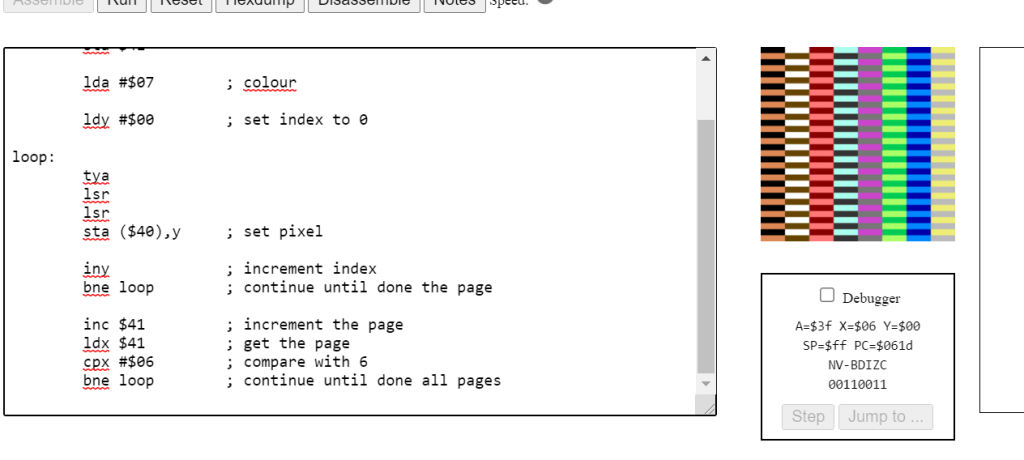
We can predict that the color code will be divided by 4(2^2). In this case, we need 64 (loop 64 times, 16 = 64/4) pixels to show a 16 color circle and every color will be shown 4 times. We believe the vertical line will be break cause the number for pixels in each line cannot be divided by loop times of a circle of showing all colors.
What if we delete all lsr and write an asl between loop and sta ($40), y?
In this case, we can make sure that the last digit of data in register A will not be an odd number because the data in register A is multiple by 2.
we can see the last digit will be 0, 2, 4, 6, 8 ,A, C, E, 0…
There are only 8 colors in a color circle!
Also when we shift again, the number of colors reduces by half. Until there will only be 0 at the last of the color data, the screen will only show black
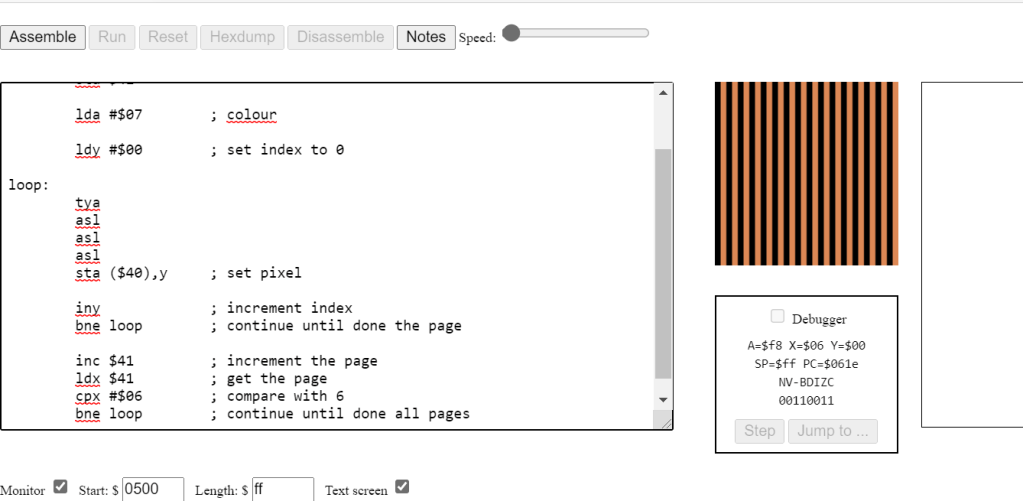
result of shift left 3 times, only 2 colors left.
Now we play around with register A, what if you do something to register Y, what will be the result?
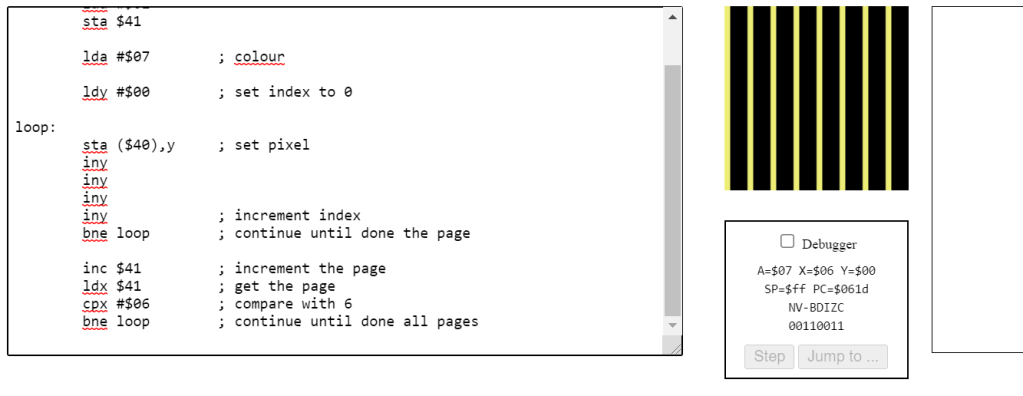
Let’s clear all tya and asls, and add an extra iny.
In this case, our program will not go through the whole screen, it will actually go through half of the screen because the y will never be an odd number before it reach 00 – end of the loop. So, if there are 4 iny, the program will only render one fourth of the screen.
What if we have 3 inys?
This will be an interesting questions. For 3 inys, the program will render 0, 3, 6, 9, C, F for the first circle. What’s next? the data got overflow, so F+3 will be 2!
Then its rendering, 2, 5, 8, B, E then overflow again, E+3 is 1 and start loop again: 1, 4, 7, A, D. After we add 3 again, the data will be 0, loop end. so that can say that if we increase y odd times, it will finally render the whole screen – just slower!
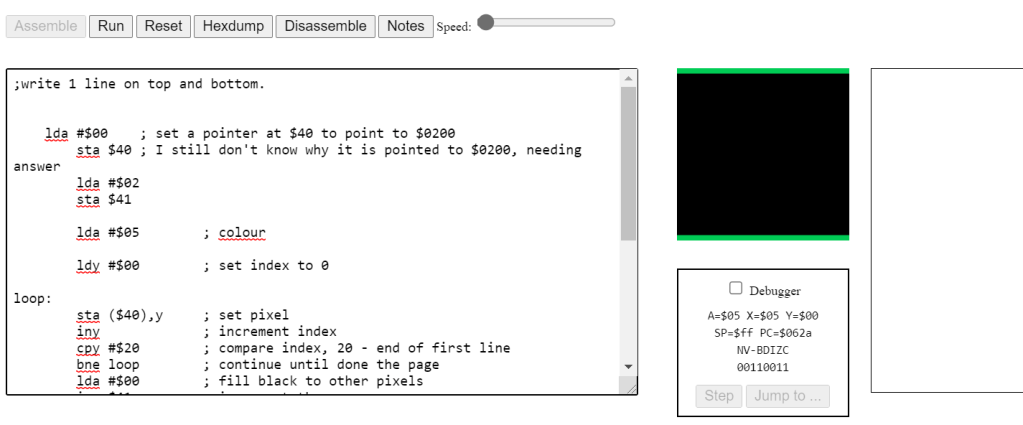
Writes 1 – lines on the top and bottom:
;write 1 line on top and bottom.


    lda #$00	; set a pointer at $40 to point to $0200
	sta $40	; I still don't know why it is pointed to $0200, needing answer
	lda #$02
	sta $41

	lda #$05	; colour

	ldy #$00	; set index to 0

loop:
	sta ($40),y	; set pixel
	iny		; increment index
	cpy #$20	; compare index, 20 - end of first line
	bne loop	; continue until done the page
	lda #$00	; fill black to other pixels
	inc $41		; increment the page
	ldx $41		; get the page
	cpx #$05	; if last page of the screen - last 1/4
	bne loop

loop2:
	;sta ($40),y ; this line is not needed
	iny ; increase index
	cpy #$E0 ; compare index, E0, last line of the page
	bne loop2
	lda #$05 ; set green color
loop3:
	sta ($40),y ; set pixels
	iny
	bne loop3
In this approach, we render the first line of screen: 0x0200 – 0x022F, first 32 pixels in first page.
Then we will ignore all other pixels of the page until we got 0x05E0, the last line of the screen, last 32 pixels in last page. then we render it, we got lines on the top and bottom
Write 2 – lines on the left and right:
; write 2 line left and right

	lda #$00	; set a pointer at $40 to point to $0200
	sta $40
	lda #$02
	sta $41
	lda #$00
	sta $42 ;counter to 0

	lda #$07	; colour yellow
	ldy #$00	; set index to 0
	sta ($40),y
loop:
	iny		; increment index
	inc $42; ; increment counter
	ldx $42; load the counter
	cpx #$1F;  check if the counter 1F(32) - it is the last pixel of the line.
	bne loop; if no, loop until get the last pixel of the line.
	lda #$04; color purple
	sta ($40), y ;set pixels
	iny ;increment index
	lda #$07;
	sta ($40), y ;we got the first pixel of next line, or the first pixel of the page.
	ldx #$00; reset counter
	stx $42; store the counter back
	cpy #$00;
	bne loop;loop until done of the page.

	inc $41		; increment the page
	ldx $41		; get the page
	cpx #$06	; compare with 6
	bne loop	; continue until done all pages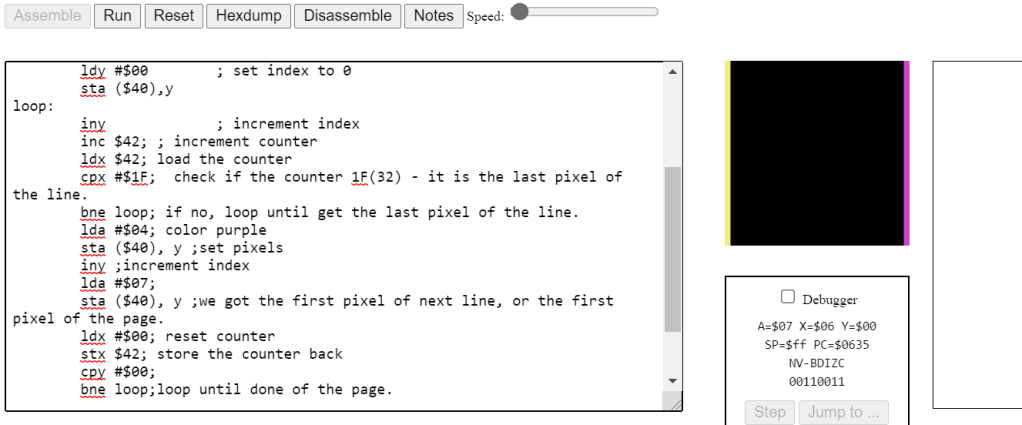
If we want to render the line on the left and right, we can render the first pixel and the last pixel of every line. We know that every line has 32 pixels, so we need a counter to know if we are in the the last pixel of a line – next pixel must be the first pixel of next line!
But there is an issue, when the program reach the last of a page, it cannot get the first pixel of next page because the address is pointed by the pointer! However, our program still rendered 2 lines as expected. Why?
After we reached the last pixel of a page, we need try to get the first pixel of next line and the machine does give our program a pixel – but it is the first pixel of current page instead of the first pixel of next line!
My impression of the Assembly Language:
It scared me when I first time heard about it. But actually when I am doing it, it is not hard as I thought. It is actually let the programmer program a machine step by step in a lower level. We have more control of memory so that we can write a high performance program.
I played a game call Human Resources Machine, which is very similar with writing in Assembly Language.
The loop, if, switch statements in higher level language like C/C++ are actually implemented by Jump function in Assembly!
(To be continued)
 Shichao's SPO600